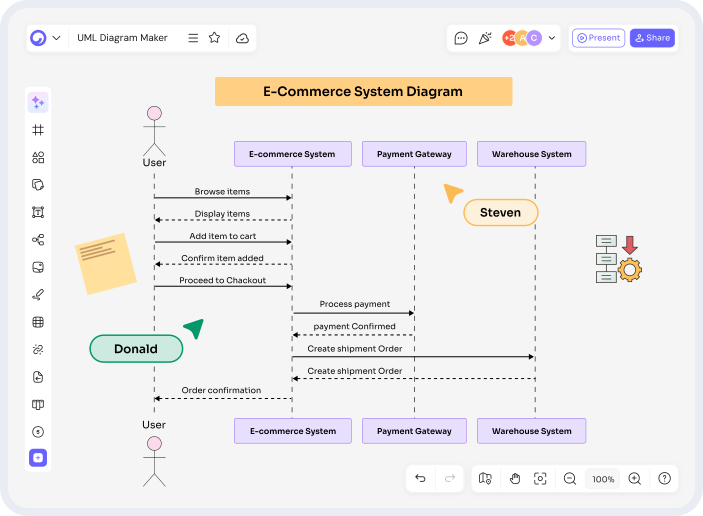

Understanding how different components of a system interact can sometimes feel like trying to follow a complicated conversation between dozens of people at once. Messages go back and forth, processes trigger other processes, and suddenly things become confusing. That’s where a sequence diagram generator becomes incredibly useful.
Instead of struggling to describe system behavior using long documentation, you can instantly turn interactions into clear, visual diagrams. A well-designed sequence diagram helps developers, designers, and teams understand exactly how systems communicate with each other.
Think of it like a storyboard for software. Just as filmmakers sketch scenes before shooting a movie, developers map interactions before building applications. And with modern tools, creating these diagrams is faster and easier than ever.
Introduction to Sequence Diagram Generators
Before diving deeper, let’s start with the basics. What exactly does a sequence diagram generator do, and why has it become an essential tool in modern software development?
What is a Sequence Diagram?
A sequence diagram is a type of Unified Modeling Language (UML) diagram that shows how objects interact in a specific order over time. It illustrates the sequence of messages exchanged between components in a system.
Why Visualizing System Interactions Matters
Complex systems can have hundreds of interactions happening simultaneously. Reading paragraphs of technical documentation to understand these flows can be exhausting.
Visual diagrams simplify everything.
They allow teams to quickly see how processes connect, identify potential issues, and ensure every step works as expected.
What is a Sequence Diagram Generator?
A sequence diagram generator is a digital tool that automatically creates sequence diagrams based on user input or system data.
Instead of drawing diagrams manually, users can generate professional UML diagrams quickly using smart features and automation.
Why Developers and Teams Use Sequence Diagram Generators
Software development involves constant communication between components. Visualizing these interactions improves efficiency and clarity across teams.
Simplifying Complex System Processes
Large systems often involve multiple services, APIs, databases, and microservices.
A sequence diagram generator simplifies these interactions into an easy-to-understand flow.
Improving Collaboration Among Teams
Developers, product managers, and designers all need to understand how a system works.
Diagrams create a shared visual language that everyone can understand quickly.
Saving Time in Software Documentation
Documentation is essential but time-consuming.
Generating diagrams automatically reduces manual work and keeps documentation accurate and up to date.
Key Features of a Modern Sequence Diagram Generator
Modern diagram tools offer powerful features designed to improve productivity and usability.
Drag-and-Drop Diagram Creation
Users can easily build diagrams using intuitive drag-and-drop elements, making the process accessible even for beginners.
AI-Powered Diagram Generation
AI tools can convert simple descriptions into structured diagrams.
For example, typing a system interaction can instantly produce a visual sequence diagram.
Real-Time Collaboration
Teams can work together on the same diagram in real time, making brainstorming and design discussions much easier.
Export and Sharing Options
Diagrams can be exported in various formats such as PNG, PDF, or SVG, making them easy to include in presentations and documentation.
Conclusion
A sequence diagram generator is more than just a diagram tool. It’s a powerful way to simplify complex system interactions and communicate ideas clearly.
By transforming processes into visual flows, teams can design better systems, improve collaboration, and reduce confusion during development.
As AI continues to evolve, creating professional UML diagrams will become even faster and more intuitive. Whether you are a developer, designer, or student, using a sequence diagram generator can dramatically improve how you visualize and understand system behavior.
FAQs
- What is a sequence diagram generator used for?
A sequence diagram generator helps users automatically create UML sequence diagrams that visualize interactions between system components. - Who should use a sequence diagram generator?
Developers, software architects, project managers, students, and business analysts can all benefit from using sequence diagram generators. - Can beginners create sequence diagrams easily?
Yes. Most modern tools include drag-and-drop interfaces and AI assistance, making them easy to use even for beginners. - Are sequence diagrams only used in software development?
No. They are also used in business process modeling, workflow analysis, and educational environments. - How does AI improve sequence diagram generation?
AI can automatically convert text descriptions or structured inputs into visual diagrams, saving time and reducing manual work.