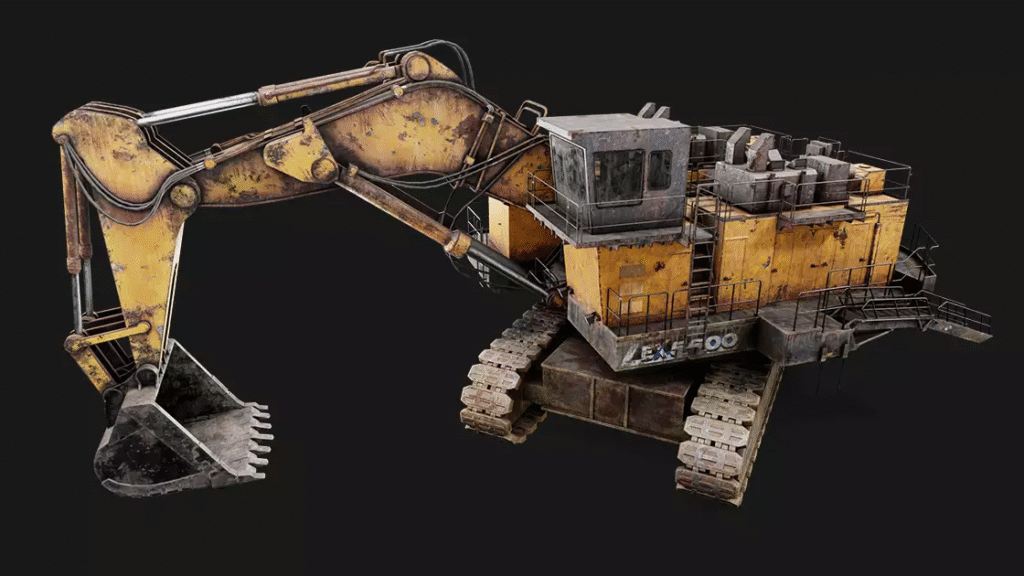

Designing realistic weapons, cars, robots, machines, and mechanical sceneries in the games demands accuracy, imagination, and high technical abilities. Such a process is referred to as hard surface modeling for games – a core element of contemporary game development pipelines.
Visual fidelity, on both the side of movies and stylized indies, relies greatly on the ability of the artists to create inorganic assets with clean surfaces, solid design language, and efficient geometry.
Experts use advanced software, workflow, and powerful plug-ins to attain production-level quality. This is where effective pipelines of hard surface modeling in 3D play in, allowing artists to create art more quickly, intelligently, and have greater control over their properties.
The following is a detailed list of the tools, workflows, and techniques that formed the current response to the hard surface modeling of games, as well as techniques that are used by studios to ensure consistency and real-time performance.
Importance of Hard Surface Assets in the Modern Games
Hard surface modeling is not only a technical process, but it also affects the tone and narration of a game world. Each machine or weapon is a bright manifestation of logic, culture, and the technological level of the universe of the game.
These assets are crucial for:
- Creating realistic sci-fi, military, and industrial environments.
- Representing the mechanics of the game visually.
- From the first-person and movie-like camera views.
- Making environments more realistic and convincing.
- Improving immersion by detailing the tactile surfaces.
The game world would be visually incomplete without the well-thought-out hard surface elements.
Important Software in Hard Surface Modelling in Games
No tool is employed in all studios; instead, artists combine various tools based on the style, fineness required, number of polygons, and rendering demands. But the most popular software that is used by professional groups includes:
Core Modeling Tools
- Blender: Free, powerful, and suitable for procedural and manual modeling.
- Autodesk Maya: Animation and topology-ready meshes favorite in the industry.
- 3ds Max: Powerful with architectural and engineering styles of buildings.
- Modo: Reputed to have user-friendly modeling and UI.
Detailing & Sculpting
- ZBrush: Utilized in high-frequency details and organic surface transitions.
- CAD Software: Utilized in the case of accurate parts in science fiction and industrial designs.
Texturing & UV Tools
- Substance Painter: A Texture creation tool of industry-quality, realistic, and stylized textures.
- Designer: To make procedural materials.
- RizomUV and Blender UV tools: UV unwrapping tools.
A combination of these tools assists artists to provide production-ready hard surface modeling of games in any of the following styles: stylized, realistic, futuristic, retro, or hybrid.
Basic Workflow of 3D Hard Surface Modeling
Although each studio is unique, a standard pipeline ensures the prevention of errors, keeps things optimized, and accelerates the process of iterating. The general steps of 3D hard surface modeling would be:
Concept & Blockout
- Simple shapes are to be employed in the definition of silhouette and volume.
- Determine design purpose -Is it a weapon? A robot? A prop that is relevant to the game?
- Gameplay distance readability test.
Mid-Poly & Refinement
- Design significant shapes and changes of surfaces.
- Pay attention to the accuracy of proportions and the distance between the panels.
High-Poly Detailing
- Apply bevels, chamfers, and surface breakups as a way of making it look real.
- Add micro detailing with ZBrush or decals.
- Use intelligent materials in visual testing.
Low-Poly Optimization
- Eliminate wastage of loops and minimise poly budget.
- Clean and shaded, and deformed areas.
UV Unwrapping
- Make emphasis on straight shells and equal density of the texel.
- No overlapping or stretching.
Texturing & Baking
- Normal, curvature, and ambient occlusion bakes.
- Apply paint on custom wear, dirt, and edge definition.
- Use PBR-compatible materials.
With this simplified workflow, game hard surface modeling is efficient, scalable, and compatible with the real-time game engines, such as Unreal and Unity.
Significance of On-Time Optimization
An impressive render is not always effective in the gameplay. As a matter of fact, it can also slow down performance unless it is optimized. This is the reason why studios focus on real-time preparedness when it comes to 3D hard surface modeling.
The optimization priorities are:
- Controlled polygon density
- Optimised LoD systems
- Smart texture compression
- Effective allocation of materials.
- Reduced draw calls
One of the stages in production pipelines is performance testing. Sometimes the asset is visually appealing, but it results in frame drops, then that needs to be redesigned, even though aesthetically attractive.
High-Tech Tools That Accelerate Hard Surface Production
Automation and procedural systems have improved the manual modeling of modern pipelines. Other tools that can help make the hard surface modeling games smarter and less time-consuming include:
Accelerating Software & Extensions
- Hard Ops / BoxCutter (Blender) – The best to use in the construction of models without being destructive.
- MESHmachine (Blender) – Assists in bevels and surface transitions.
- CAD Sketch Plugins – To get accuracy in geometry.
- Kitbash Libraries – Reuse time-saving components.
Procedural modeling enables artists to repeat more quickly and to be flexible – a requirement in studio settings where time is of the essence.
The Workflows of Texturing Assets to Life
Textures define realism. They can show both a worn-out surface, a metallic surface, a painted surface, a scratched surface, a rusted surface, and a polished surface. This is a stage that is very important in game-ready pipelines.
The process of texturing would be reliable when:
- Baking with Marmoset or Substance.
- Making intelligent aging and wear.
- Overhead reduction by the use of decals on polygons.
- Substance painter layer-based texturing.
- Evaluation of assets in engine-specific light.
The steps assist in making 3D hard surface modeling appear like it is actually on the real surface without compromising on real-time performance.
Future Trends in Hard Surface Modeling for Games
Asset creation tools are being transformed as game engines continue to change. The work of artists is being changed by procedural modeling, work automation with AI-assistance, and real-time visualization to create works.
Upcoming trends include:
- Asset generation in Houdini.
- Artificial intelligence-based design support.
- Simulation of physically realistic edge wear.
- Automated retopology tools
- Asset blockouts VR design systems.
Such inventions will transform the history of hard surface modeling of games by allowing artists to execute better quality tasks in quicker turnaround rates.
Conclusion
Having potent tools, built-in pipelines, and emerging ways, hard surface modeling for games takes the form of influencing the aspect of immersion and realistic play in a video game. The integration of technology and artistic direction makes the modern practitioners in the industry move 3D hard surface modeling to a level where accuracy, narrative, and acting combine to recreate digital worlds.