
Have you ever wondered how computers understand numbers? They don’t think in decimals like we do — they use binary. That’s where a Decimal To Binary Converter becomes super useful. It helps you turn any decimal number (like 25 or 102) into its binary form (like 11001 or 1100110) instantly.
Why Use a Decimal To Binary Converter?
If you’re learning computer science or coding, converting manually can be time-consuming. A good Decimal To Binary Converter saves you time and reduces mistakes. It’s great for:
Students learning data representation
Programmers working with low-level machine logic
Electronics and hardware enthusiasts dealing with digital circuits
How It Works
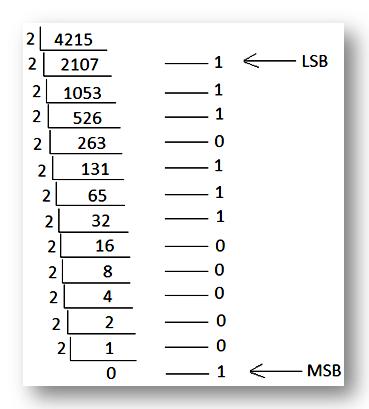
The converter takes your decimal number and divides it by 2 repeatedly, collecting remainders to form the binary output. While this may sound complex, an online Decimal To Binary Converter performs this operation in a split second — giving you accurate results every time.
Benefits of Using an Online Tool
Speed: Converts numbers instantly without manual calculation.
Accuracy: Eliminates conversion errors.
Ease of Use: Just enter your decimal number and get the binary output.
Learning Aid: Perfect for understanding binary logic visually.
In decimal to binary conversion, we convert a base 10 number to a base 2 number using simple methods. For example, if 12 is a decimal number, its binary equivalent becomes 1100. Therefore, you can quickly convert any decimal number to binary by applying simple tricks, which you will learn here. Students can also use online converters to convert any decimal number to its corresponding binary format. In number systems, you must have studied different types of numbers such as;
Binary numbers – base 2
Octal numbers – base 8
Decimal numbers – base 10
Hexadecimal numbers – base 16
These numbers can be easily converted from one system to another, such as decimal to binary, decimal to hexadecimal, decimal to octal, and vice versa.
Decimal to Binary Conversion
Decimal numbers use base 10, while binary numbers use base 2. During decimal to binary conversion, the base of a number changes from 10 to 2. Each decimal number has a corresponding binary number. These binary numbers are widely used in computer applications, especially for programming and coding tasks. This is because computers operate using binary digits, 0 and 1, which form the basic language that machines understand.
Decimal System
The decimal number system is the most widely used system and standard in our daily lives. It operates on base 10 (the alphabet). This means that it has 10 symbols: the digits 0 to 9; specifically, 0, 1, 2, 3, 4, 5, 6, 7, 8, and 9.
As one of the earliest number systems, the decimal system was used by numerous ancient civilizations. It made it easier to represent very large numbers with the Hindu-Arabic number system. This system places digits in numbers using powers of 10; each digit is raised to the power of its place and multiplied by 10.
For example, consider the number 2345.67 in decimal notation:
The digit 5 is in the ones place (10⁰, which is equal to 1)
4 is in the decimal place (10¹)
3 is in the hundreds place (10²)
2 is in the thousands place (10³)
After the decimal point, 6 is in the tenths place (1/10, which is 10⁻¹) and 7 is in the hundredths place (1/100, which is 10⁻²)
Thus, we can also write 2345.67 as follows: (2 × 10³) + (3 × 10²) + (4 × 10¹) + (5 × 10⁰) + (6 × 10⁻¹) + (7 × 10⁻²)
Binary System
The binary number system works on base 2 (radix). Being a base-2 system, it has only two digits: 0 and 1.
Although it appeared in ancient Egypt, China, and India for various uses, the binary system now serves as the language of electronics and computers. It effectively represents the off (0) and on (1) states of an electrical signal. Binary code forms the basis of data in computers. The digital content you are reading now is also ultimately made up of binary numbers.
Binary numbers are easy to understand: they are a positional system, so each digit is raised to the power of 2, starting with the rightmost digit 2⁰. In binary, each digit corresponds to 1 bit.
How to Convert Decimal Numbers to Binary Numbers?
We can convert a given decimal number to binary using formulas, division method, and many other methods. In this section, you will learn how to convert decimal numbers to binary using division method. To convert a decimal number to binary number, follow the steps given below:
Step 1: Divide the decimal number by “2”, which gives a remainder with division.
Step 2: If the decimal number is even, the division gives a whole number, and the remainder will be “0”.
Step 3: If the decimal number is odd, it cannot be divided evenly, and the remainder will be “1”.
Step 4: Arrange all the remainders in order, placing the least significant bit (LSB) at the top and the most significant bit (MSB) at the bottom. This way, you get the required binary number.
Final Thoughts
A Decimal To Binary Converter is more than a tool — it’s a simple way to understand how computers think. Whether you’re a student, developer, or tech enthusiast, using one will make learning binary much easier. Give it a try today and see how quickly you can decode the language of machines.