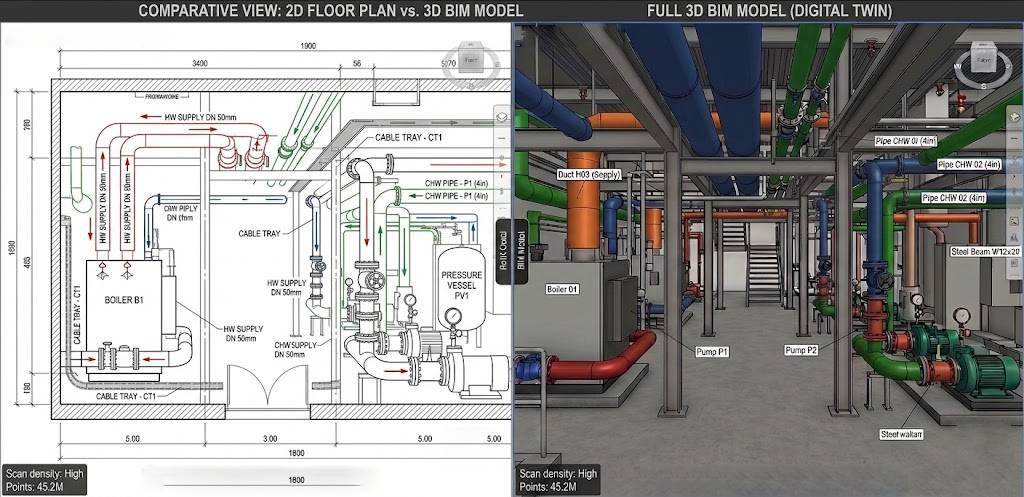

Many firms still have large libraries of project files stored as 2D CAD drawings. These files represent years of completed work, and they hold valuable information about building layouts, system configurations, and site conditions. However, 2D CAD data has limitations in a modern project environment that increasingly relies on 3D coordination, data-rich models, and integrated workflows.
CAD to BIM conversion bridges this gap. It takes existing 2D drawings and transforms them into intelligent 3D BIM models that support modern design, coordination, and construction processes.
What Does CAD to BIM Conversion Involve?
CAD to BIM Conversion is not simply importing a CAD file into Revit. It is a structured process that involves interpreting 2D drawing information and rebuilding it as a parametric, data-rich 3D model. The process includes:
- Reviewing the CAD drawings for completeness and accuracy
- Setting up the BIM environment with correct project standards and templates
- Modeling architectural elements such as walls, floors, roofs, doors, and windows
- Adding structural elements including columns, beams, and slabs
- Modeling MEP systems from schematic or design development drawings
- Adding parameters, data, and relationships to each model element
- Coordinating across disciplines to produce a federated model
The output is a functional BIM model that carries the information from the original drawings plus the intelligence that BIM software adds through parametric relationships and data structures.
How Architects Benefit?
Architects working on renovation, expansion, or design development projects often start with CAD drawings from a previous phase or a previous project. Converting these drawings to BIM gives architects a working model they can develop directly, rather than re-drawing everything from scratch.
BIM also supports design visualization, coordination with consultants, and documentation in ways that 2D CAD cannot match. Once the CAD data is converted, the architect has access to automatic area calculations, 3D views, section generation, and coordinated drawing sets that update when the model changes.
How Engineers Use Converted BIM Models?
Structural and MEP engineers receive BIM models from architects and use them as the base for their own discipline models. If the architect is still working in CAD, engineers often need to recreate the base building from scratch in their BIM environment, which is duplicated effort.
When the architectural drawings are converted to BIM first, engineers can link the model directly and build their systems on top of it. This saves time, reduces errors from re-entry, and ensures all disciplines are working from the same building geometry.
Engineers also use CAD to BIM conversion for their own legacy files. Older project files with pipe routing, electrical layouts, or structural details can be converted into BIM models that support current analysis tools and coordination workflows.
Contractor Applications
Contractors often receive a mix of drawing formats on a project. When 2D CAD drawings are the only source of information, contractors face challenges in quantity takeoffs, subcontractor coordination, and prefabrication planning.
CAD to BIM conversion allows contractors to work from a single, coordinated 3D model. Quantity takeoffs become more accurate because they are derived from model geometry. Coordination between trades becomes easier because all systems are visible in three dimensions. And prefabrication becomes more reliable because dimensions and specifications come directly from the model.
Preserving and Modernizing Legacy Project Data
Firms with large CAD archives face a long-term data management challenge. 2D files are harder to search, reuse, and update than BIM models. Converting selected legacy projects to BIM allows firms to:
- Maintain accurate as-built records for existing facilities
- Support facility management teams with better data
- Reuse building data for future renovation or expansion projects
- Meet client requirements for BIM deliverables on ongoing projects
Prioritizing which projects to convert based on future use and project value helps firms manage the conversion process efficiently without converting every file in their archive.
Choosing the Right Level of Detail
Not every CAD to BIM conversion needs the same level of detail. The appropriate LOD (Level of Development) depends on how the model will be used. A model for early design development needs less detail than a model for construction coordination.
Working with a qualified BIM team to define the scope of conversion before starting ensures the output matches the project requirement without over-investing in detail that adds cost without adding value.
Whether you are a firm looking to modernize your design workflow, a contractor trying to coordinate a complex renovation, or an owner who wants better data for facility management, CAD to BIM conversion is a practical step toward a more capable project environment.