
When organizations rely on remote collaboration, good video conferencing services are no longer optional — they determine productivity, trust, and how well teams connect across distance — and selecting the right provider goes beyond feature lists to include deployment practices, network readiness, security posture, user experience, and long-term support. Choosing a vendor is only the first step; true success comes from careful planning, staged rollouts, governance, device orchestration, and ongoing user adoption programs that turn technology into habit rather than interruptive overhead. If you are evaluating providers or modernizing an existing deployment, focus first on the practical outcomes you need: meeting reliability, low latency, simple join flows, robust moderation controls, integration with calendaring and identity systems, and clear security guarantees.
Why Video Conferencing Services Drive Modern Workflows
Video conferencing is the connective tissue of modern organizations. It replaces hallway conversations, transforms sales demos, accelerates hiring, and extends education beyond the classroom. The difference between a great and a mediocre service shows up in everyday moments: whether meetings start on time, whether remote participants are heard and seen clearly, and whether content sharing works reliably. Beyond features, services must match organizational needs. Small teams prioritize simplicity and cost; enterprises prioritize security, compliance, and integration with corporate identity and recording policies. Understanding these priorities guides vendor selection and deployment choices.
Defining Success Criteria Before You Buy
Before selecting a service, define clear success criteria. Decide which meeting types matter most: small ad-hoc team calls, all-hands broadcasts for thousands, or secure client meetings requiring recorded consent. Define acceptable failure modes and thresholds for metrics like join time, audio/video drop rate, and resolution under constrained bandwidth. Establish compliance needs such as retention windows, region-specific data residency, and whether recordings must be encrypted at rest. Clear criteria translate into testable acceptance criteria during pilot phases rather than feature-checklists that hide hard trade-offs.
Network Readiness And Quality Of Experience
A perfect service on a poor network produces terrible meetings. Network readiness is fundamental: perform baseline assessments for bandwidth, packet loss, jitter, and Wi-Fi coverage in high-use areas. Optimize networks for real-time media by prioritizing traffic with Quality of Service policies, separating guest Wi-Fi from corporate devices, and using wired connections for dedicated rooms and broadcast stations. In busy remote-work homes, encourage participants to use wired connections when possible and to avoid simultaneous high-bandwidth streams during critical meetings. Quality of experience engineering reduces one of the biggest sources of user frustration.
Room Systems, BYOD, And Device Strategy
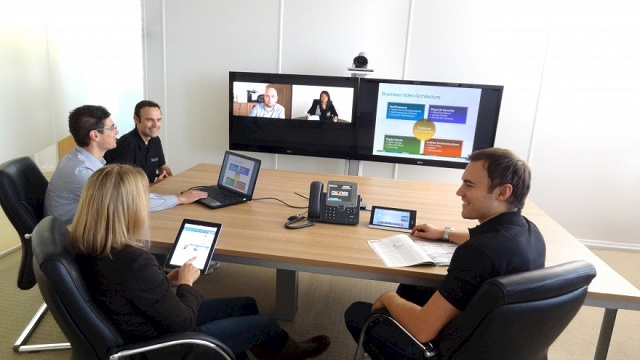
Decide whether meeting rooms will be BYOD, dedicated room systems, or a hybrid. Dedicated room systems with calibrated cameras, microphones, and displays produce reliable experiences for in-office gatherings. BYOD approaches increase flexibility but require robust device profiles, soft codec support, and user guidance. Hybrid models can offer both: dedicated huddle-room kits for small meetings and flexible laptop-based workflows for ad-hoc calls. Standardizing device procurement and providing recommended device lists reduces variability and support load.
Integration With Identity, Calendar, And Collaboration Tools
Seamless integration with corporate identity providers and calendaring systems eliminates friction and improves meeting security. Single sign-on and calendar invite joins reduce link confusion and prevent accidental public sharing. Integrations with chat platforms, collaboration whiteboards, and document management systems enable richer workflows inside meetings. Choose a platform that supports standardized APIs or native integrations for the tools your teams use daily to avoid custom, brittle glue code.
Security, Privacy, And Compliance Considerations
Security must be both strong and usable. End-to-end encryption is valuable but comes with trade-offs for features like cloud recording or multi-device joins; evaluate which encryption models satisfy your compliance obligations while preserving necessary functionality. Implement identity-based access controls, meeting passcodes, waiting rooms for moderated entry, and role-based permissions for presenters and recording. For regulated industries, ensure audit logs, retention policies, and data residency commitments align with legal requirements. Vendor transparency about security architecture and third-party audits eases procurement.
Recording, Transcription, And Data Governance
Recording meetings provides auditability and asynchronous access, but it also creates governance responsibilities. Define who can record, where recordings are stored, and how long they are retained. Transcription services add value for accessibility and search but raise privacy concerns; clarify whether transcriptions occur in the cloud and how long text outputs persist. Create an explicit retention schedule and automate lifecycle management for old recordings to avoid accumulating sensitive data indefinitely.
Scalability And Event Workflows
Not all services scale the same. Large webinars, town halls, and training events require different architectures than small huddles. Ensure the provider supports event workflows such as moderated Q&A, registration pages, streaming to public CDNs, and speaker management. Load-test critical large-scale workflows to validate latency, moderation tools, and broadcast quality. A unified vendor that handles both everyday calls and large events reduces operational complexity but verify they meet the specific needs of both use cases.
User Experience And Adoption Programs
Technology only succeeds with adoption. Provide a frictionless first-run experience: one-click joins, reliable pre-join audio/video checks, and consistent meeting naming conventions. Offer short training, quick reference guides, and an accessible support contact for the first months of rollout. Identify power users and champions to model best practices and gather feedback. Track usage metrics and survey users periodically to surface pain points and iterate. Adoption programs that emphasize day-one support and simple wins accelerate cultural acceptance.
Managing Hybrid Meetings Effectively
Hybrid meetings — with some participants in-room and others remote — pose specific challenges including audio pickup, camera framing, and participant parity. Place room microphones to avoid audio dropouts and use group cameras that capture both a speaker and the room to preserve context. Use workflows that spotlight remote participants when they speak and encourage in-room attendees to use individual mics for clarity. Train facilitators in hybrid moderation techniques like repeating audience questions and monitoring chat so remote participants have equal visibility.
Interoperability And Vendor Lock-In
Avoid vendor lock-in by preferring solutions that support industry-standard protocols and open APIs. Interoperability reduces the risk of being stuck if a vendor changes pricing or roadmap. For interoperability, test SIP/H.323 gateways if you must bridge to legacy hardware, and verify how the vendor handles call federation between different domains. Document your exit plan and ensure exported logs and recordings can be migrated if needed.
Monitoring, Analytics, And Support Model
Operational visibility matters. Use monitoring dashboards to track call quality, device status, and room health. Define support tiers for incident response and create runbooks for common failures like network outages or calendar sync issues. Determine whether you need vendor-managed support, a managed service partner, or internal staff for first-level troubleshooting. Proactive monitoring and clear escalation reduce downtime and limit user frustration.
Cost Models And Total Cost Of Ownership
Evaluate pricing models holistically. Vendor sticker prices rarely reflect true TCO. Factor device costs, room systems, network upgrades, managed services, training, and the administrative overhead of licenses. Consider hybrid licensing for seasonal or occasional users and negotiate predictable enterprise agreements that include support SLAs. A carefully modeled TCO helps justify investments in infrastructure that reduce running costs and improve meeting quality.
Accessibility, Inclusion, And Global Considerations
Design meeting workflows that include captions, real-time translation where needed, and accessible interfaces for participants with disabilities. For global organizations, consider local data residency, regional CDN presence, and regional support availability. Test the user experience in low-bandwidth regions and provide alternative dial-in paths or lower-bandwidth modes to preserve inclusion.
Future-Proofing: AI, Immersive Formats, And Standards
Emerging capabilities like live AI-assisted notes, automated action item extraction, and enhanced speaker tracking are rapidly maturing. Choose vendors that provide modular AI features and that clearly document data handling. Keep an eye on immersive formats and spatial audio for higher-fidelity remote presence, but be pragmatic: prioritize reliable basics first. Future-proofing means choosing vendors with clear roadmaps, standards alignment, and reasonable exportability of recorded materials.
Conclusion: Make Meetings Work For People
Video conferencing services are tools for human connection. Choosing and deploying the right service requires engineering rigor, practical governance, and sustained adoption efforts. Focus on measuring the real outcomes you need — reliability, accessibility, security, and user delight — and build the network and operational practices that make those outcomes repeatable. With the right planning and support, video conferencing becomes a dependable extension of how your organization works together across distance.